
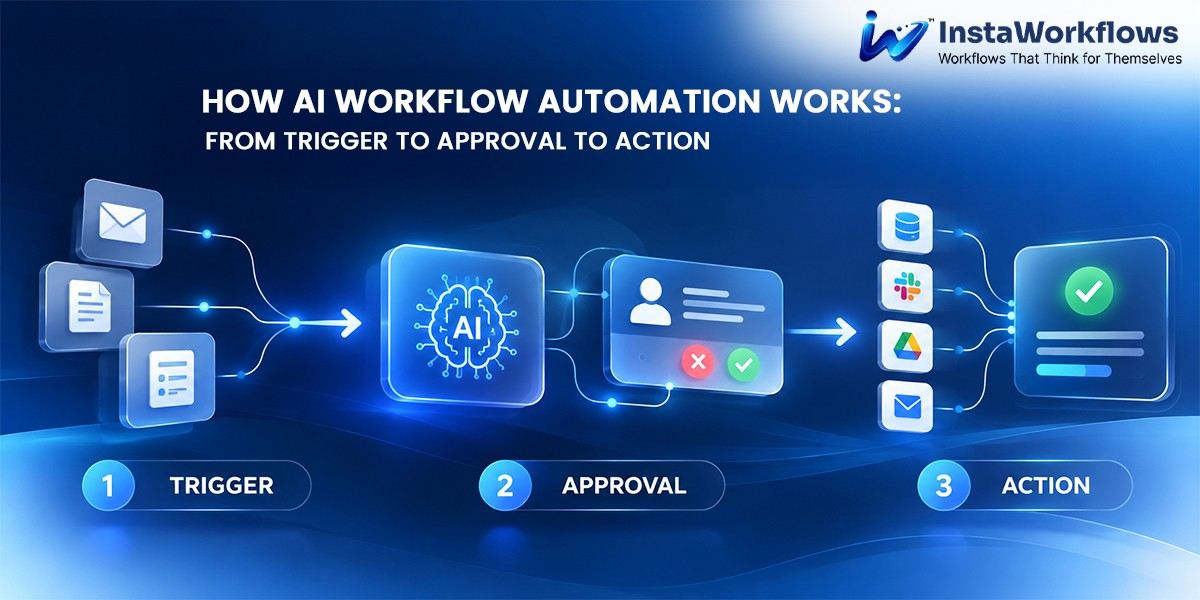
All organizations have processes, but many organizations are still using emails, spreadsheets, and follow-ups by people. AI Workflow Automation puts that all in the hands of intelligent systems that can identify an event, distribute it to the appropriate people and perform the following step without human oversight. Teams don’t need to seek approvals or re-enter data; they can work through a defined process that pushes work forward.
This article covers workflow triggers, approval routing, and what happens once a process becomes workflow-approved to get the process completed from start to finish. We also examine ways in which AI-driven workflows accelerate the process of going from idea to action and the reality of business process automation in a team of any size using the likes of InstaWorkflows.
What Is AI Workflow Automation and Why Does It Matter?
AI workflow automation is rule-based automation plus machine intelligence. Older tools do their thing, while AI-based tools can read documents, categorize requests, determine key details, and suggest the next step based on the context. This makes them much more appropriate for actual work, where you will not find inputs that are so clean and orderly, and exceptions are bound to occur.
The concept can be grasped as a simple trip, in which something occurs, and someone or something makes a decision, and then an action takes place. The same concept is the basis of today’s workflow automation software. The key is consistency, speed, and visibility – each request is routed through the same process and moves rapidly, with visibility from start to finish.
How Workflow Triggers Start Every Process
Workflow triggers start a workflow. A trigger could be a form that has been completed, an email, a new record in a business system, a status change, a time, or a customer message. The best processes require someone to remember to turn it on, a clear trigger or two.
AI enhances triggers in impactful ways. Intelligent systems can not only react to an event, but they can also interpret it. For instance, if the incoming request is urgent, it can be read and automatically assigned to the appropriate process. This ensures that the event is not repeated and the same process is followed with it every time.
In addition to avoiding the unwarranted activity that can be caused by improperly set up triggers, it is important that triggers are configured to trigger work and not noise, like a signed agreement, a new purchase request, etc. Clear definitions allow for automation to be more focused and predictable,e and if there is a deviation, then it is easier to troubleshoot.
Why Approval Routing Keeps Decisions Accountable
After a process starts, there are still numerous decisions that must be made based on human judgment. Approval routing is the way in which the appropriate item gets to the appropriate person at the appropriate time with the context necessary to make a prompt decision.
Requests are stuck in an overfilled inbox or get lost in the wrong hands, and the approval process halts. However, intelligent routing removes this scenario by automatically routing based on the budget, risk level, request type, department, etc., without manual effort. A summary is provided for the reviewers, and they can accept, reject, or propose changes, which are recorded in the system and can be reviewed at a later stage.
It’s another added advantage of AI. It allows us to warn about suspicious requests, pre-run data submitted, and offer recommendations on which data will be routine and which will be more carefully explored. This will keep them engaged when they make decisions with judgment, and reduce friction at low-risk levels. This is why organisations adopt automation in the first place and why it is essential to good governance – fast and transparent.
Taking Action: How Workflow Automation Software Completes the Loop
Once it’s approved, it’s in action. This is the point where something is created, a record is updated, a document is created, a notification is sent, a task is created, access is provisioned, or a payment is released in another system. Modern platforms integrate with business tools that are already in place, and these actions take place without any manual handoff.
With a single platform controlling the trigger, the decision, and the outcome, teams have end-to-end visibility. They are able to track each request, know where requests are stuck, and find out the duration of each stage. A robust platform also has failover mechanics that will attempt to recover or notify the owner of a failure when a connected system fails, keeping it predictable regardless of the unpredictable behavior of connected systems.
How AI-Built Workflows Shorten the Path to Automation
Historically, building automation required technical specialists, lengthy configuration, and detailed process mapping. AI-built workflows change this. A user describes the desired process in plain language, and the system proposes the structure: the trigger, the approval steps, the conditions, and the final actions.
This approach benefits teams in several ways. Business users can shape processes without waiting in development queues, changes can be tested and refined quickly, and organizations can respond to new requirements without rebuilding from scratch. Proven patterns can also be reused across departments, which encourages consistency and reduces the risk of every team inventing its own method.
InstaWorkflows are designed around this idea, helping teams move from a described need to a working automation with far less effort than traditional configuration demands.
Where Business Process Automation Delivers the Most Value
The benefits of business process automation are greatest when tasks are repetitive, involve multiple parties, and have to be documented. Common examples include:
- Requests, procurement/purchase.
- The recruitment and dismissal of workers.
- Payment of invoices & expense approval
- Taking and escalating customer requests/complaints
- Contract and document sign-off/review.
- Ask to go offsite or to enter the building. Leave and access applications.
The process always proceeds in the same fashion: a trigger initiates the process, a reviewer decides, and automated actions complete. Automation in these areas eliminates the administrative task from staff, enabling them to concentrate on analysis, relationship building, and strategic areas.
Why InstaWorkflows Fits Modern Teams
InstaWorkflows integrates these ideas into a single platform. Teams can set up a process to begin, choose who will view it, and link automated processes with minimal technical complexity. It is so AI-driven that it makes it possible to transform concepts into action in no time, and its system design leaves each process open,d transparent, and trackable. It’s a practical first step that can be expanded as needs evolve for organizations just getting started with automation. Check out the platform at instaworkflows.
Best Practices for Implementing AI Workflow Automation
Start with a process that you know and that causes conflict. Before automating anything, be sure the trigger is clearly defined, who can approve what, and what is expected as a result. Engage the individuals who utilize the process every day, look at outcomes frequently, and change guidelines as the business develops. Let computers take care of the tedious tasks and let humans take the decisive action. Finally, make sure that the platform has transparency, flexible integrations, and audit trails to govern the process as it expands.
Conclusion
AI Workflow Automation unifies the processes and builds trust. A trigger starts things off at the right time, approvals make sure that things are taken care of by the right people,e and automated actions make sure that the project is finished without delay. On top of this, setups are faster and more approachable, making business process automation more possible for teams that don’t have a lot of technical resources.
If you’re searching for a program that will take you from manual follow-ups to a structured and intelligent follow-up process, then InstaWorkflows is a good starting point.
1. What is AI workflow automation?
It is an intelligent software that initiates, directs and completes business processes with minimal human intervention. It integrates rules and AI to make processes context and exception-aware.
2. How do workflow triggers work?
A trigger is an event that starts a process automatically, like a form submission or receipt of an e-mail. Workflow triggers eliminate the need for anyone to manually start each workflow.
3. Why is approval routing important?
Approval routing makes sure that every request goes to the correct reviewer and in the correct context. It streamlines the process, ensures accountability and documents decisions.
4. How do AI-built workflows differ from manually configured ones?
AI-created workflows are created by a plain description of the process rather than a detailed technical setup. This speeds up the process of launching and adapting processes.
5. Where can business process automation be applied?
It works well in multi-step environments like procurement, onboarding, provisioning of customer requests for finance approval. Any process that has explicit rules and several stakeholders is a good candidate.
6. How does InstaWorkflows support teams?
InstaWorkflows is a tool for creating and managing automated workflows from trigger to action and approval. It is designed to be fast, transparent, and user-friendly for non-technical users.