
- Smarter CAPEX Approvals
Finance Workflow Automation Software for Faster, Organised Spend
Automate invoice approvals, purchase requests, expense claims and everyday finance processes with InstaWorkflows. Describe your process, have AI build the workflow, and let approvers act from Microsoft Teams, email or mobile. Reduce manual follow-ups, retire spreadsheet trackers and give your finance team real-time control of every approval, with no-code automation.
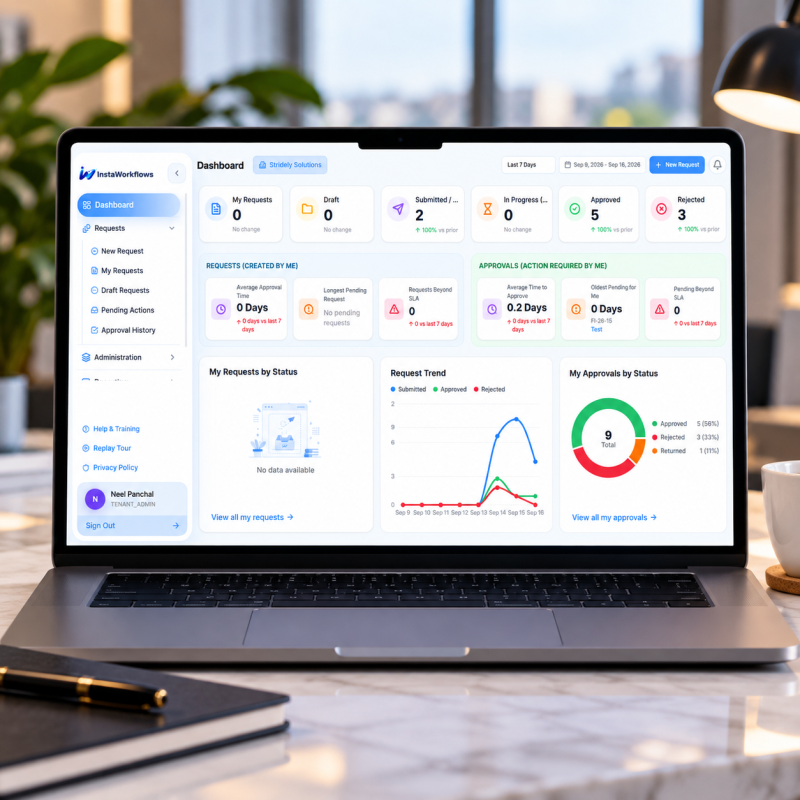
Dashboard
Stridely Solutions New Request9+My Requests by Status
My Requests by Workflow
Distribution of your requests across active workflows| Request ID | Request Title | Workflow Type | Current Tier | Status | Priority |
|---|---|---|---|---|---|
| FI-26-158 | UPS upgrade | CAPEX - Business Continuity - PP | Tier 1 | Submitted | HIGH |
| FI-26-157 | Network rollout | CTO - Multi Location | Tier 0 | Draft | ROUTINE |
| FI-26-155 | Laptop refresh | CTO - Multi Location | Tier 2 | In Progress | ROUTINE |
| FI-26-152 | Fleet expansion | Supplemental - CAPEX - Strategic | Tier 3 | Approved | HIGH |
| FI-26-151 | Backup site | Supplemental - CAPEX - Business | Tier 1 | Rejected | ROUTINE |
| Request ID | Request Title | Workflow Type | Current Tier | Status | Priority |
|---|
- Smarter Finance Approvals
What Is Finance Workflow Automation?
- Value-Based Approval Routing
- Real-Time Budget Tracking
- Complete Audit Trail
- The problem
How Manual Finance Processes Hold Back the Business
Email chains, shared inboxes and spreadsheets were not built for the volume and control finance teams need today. The cracks show up fast:
Slow approval cycles
Invoices, purchase requests and claims wait in an inbox while suppliers and employees wait for an answer.
Approvals lost in email
Decisions get buried across threads, so nobody can say what was approved or by whom.
Duplicate and missed payments
Without a single record, the same invoice can be paid twice and another can be paid late.
No live visibility
Finance cannot see where a request is stuck without searching inboxes and pinging people.
Disconnected systems
ERP, email, procurement and banking each hold part of the picture, so data is typed again and again.
Weak budget control
Overspend surfaces only at month-end close, when it is too late to act.
Audit and compliance risk
Approval proof is scattered across threads and drives, so every audit turns into a scramble.
Finance stuck on admin
The team spends its week chasing approvers and matching documents instead of analysing spend.
- Benefits
Financial Workflow Automation: Benefits
Automating approvals removes repetitive tasks, shortens delays and gives finance teams time back for analysis and planning.
Faster approval cycles
Requests go straight to the right approver, who acts from Teams, email or mobile.
Fewer errors and duplicates
Required fields, matching checks and duplicate detection catch problems before they reach payment.
Stronger spend control
Every request is checked against budget and policy before it is approved.
Audit-ready records
Every action is time-stamped and attributed, so audits take hours instead of weeks.
Full visibility
Live dashboards show every open request, bottleneck and cycle time.
Lower IT dependency
Finance changes thresholds and routing rules without raising a ticket.
- Go Live in 14 Days
Automate Finance Workflows in Days, Not Months
Our finance automation solutions help businesses turn manual approval chains into automated workflows in days, not months. Simplify approvals, reduce repetitive tasks and improve control with smarter automation, without a lengthy ERP project.
14 days.
- One Platform, Every Finance Process
Finance Workflows You Can Automate With InstaWorkflows
Start with the process that hurts most, then add the next one on the same platform.
Accounts Payable
Capture supplier invoices, match them with purchase orders and goods receipts, assign ledger codes and cost centers, and schedule payments. Flag exceptions early so clean invoices flow through automatically and only real issues reach a person.
Invoice Approvals
Route each invoice to the right approver by amount, department or vendor. Invoice approval automation adds reminders, delegation and escalation, so no invoice stalls because one approver is away.
Invoice Processing
Move from receipt and data capture to coding, three-way matching and posting in one connected flow, with duplicate checks and a time-stamped record at every step.
Purchase Orders
Raise purchase orders with budget checks built in, route them by value and category, and hand approved POs to procurement with quotes, specifications and budget codes attached.
Purchase Requests
Give non-PO purchases, one-off buys and vendor requests the same governance: smart forms, spend limits and a clear approval path from request to sign-off.
Expense Claims
Employees submit claims with receipts, policy checks run automatically and managers approve in a tap. Expense approval automation clears in-policy claims instantly and escalates exceptions with the reasoning attached.
Procurement
Connect requisition, sourcing approval, purchase order, goods receipt and payment into one flow, so buyers, requesters and finance work from the same live record.
Custom Requests
Budget transfers, vendor payment requests, credit notes, journal approvals or any custom finance form, built in minutes with the visual designer.
- Try it
Approvals happen where your approvers already work
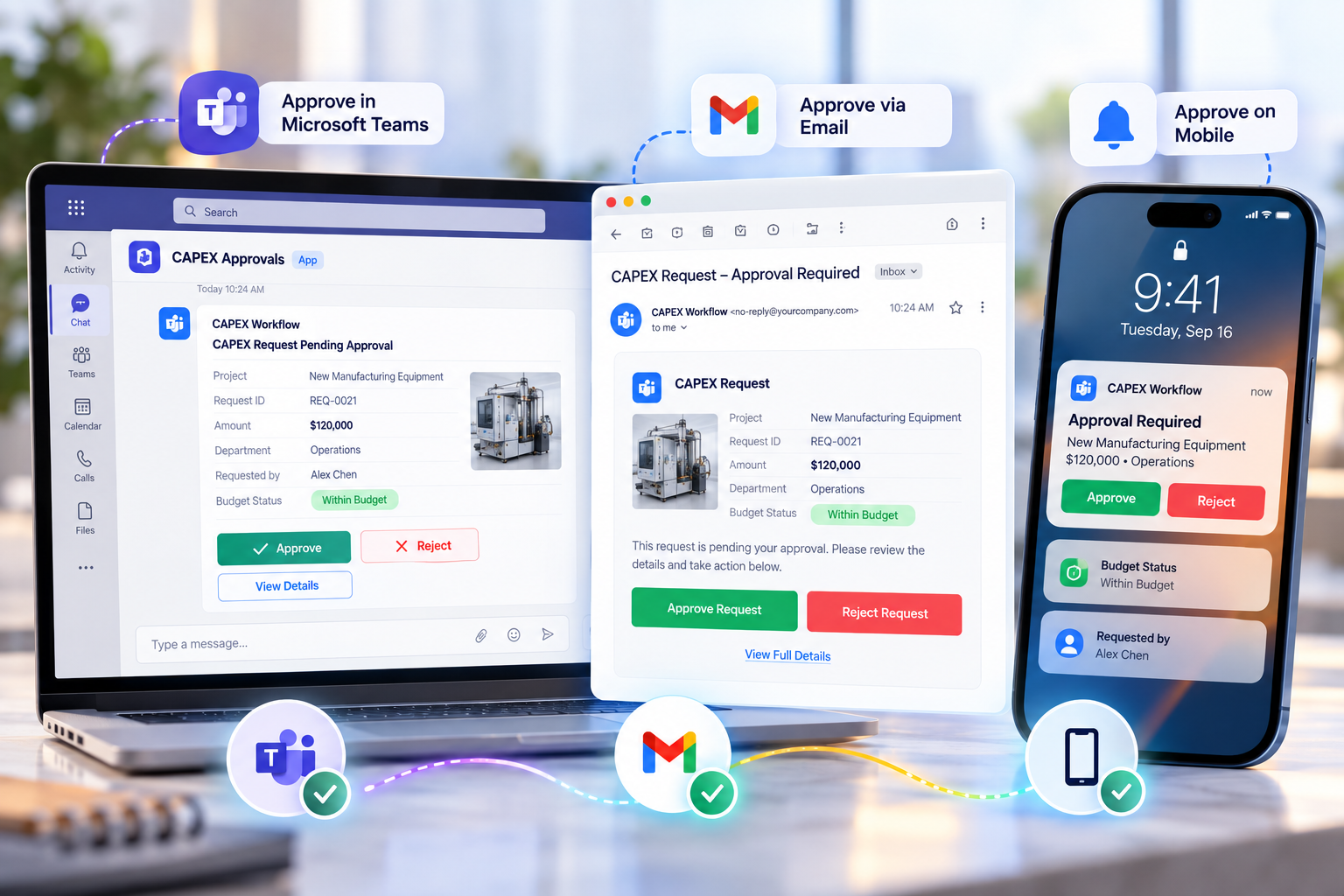
Managers should not log into another system to clear an expense approval workflow or sign off an invoice. Pick a channel, tap Approve on the phone, and watch the workflow resume. Approvers can act in Microsoft Teams, from an action button in email, or from a push notification on mobile, with no login and no context-switching.
your approvers already work.
No context-switching.
- Platform
Finance Automation Workflow Software Built for Finance Teams
Everything your finance team needs to build, manage and improve workflows independently, without waiting for developer support.
AI-first workflow design
Describe the process in plain words and AI builds the workflow and form for you to refine.
No-code visual designer
Drag, drop and publish. Change a threshold or approver without raising an IT ticket.
Smart request forms
Capture vendor details, amounts, quotes, receipts, justification and budget codes, with required fields enforced before submission.
Threshold-based routing
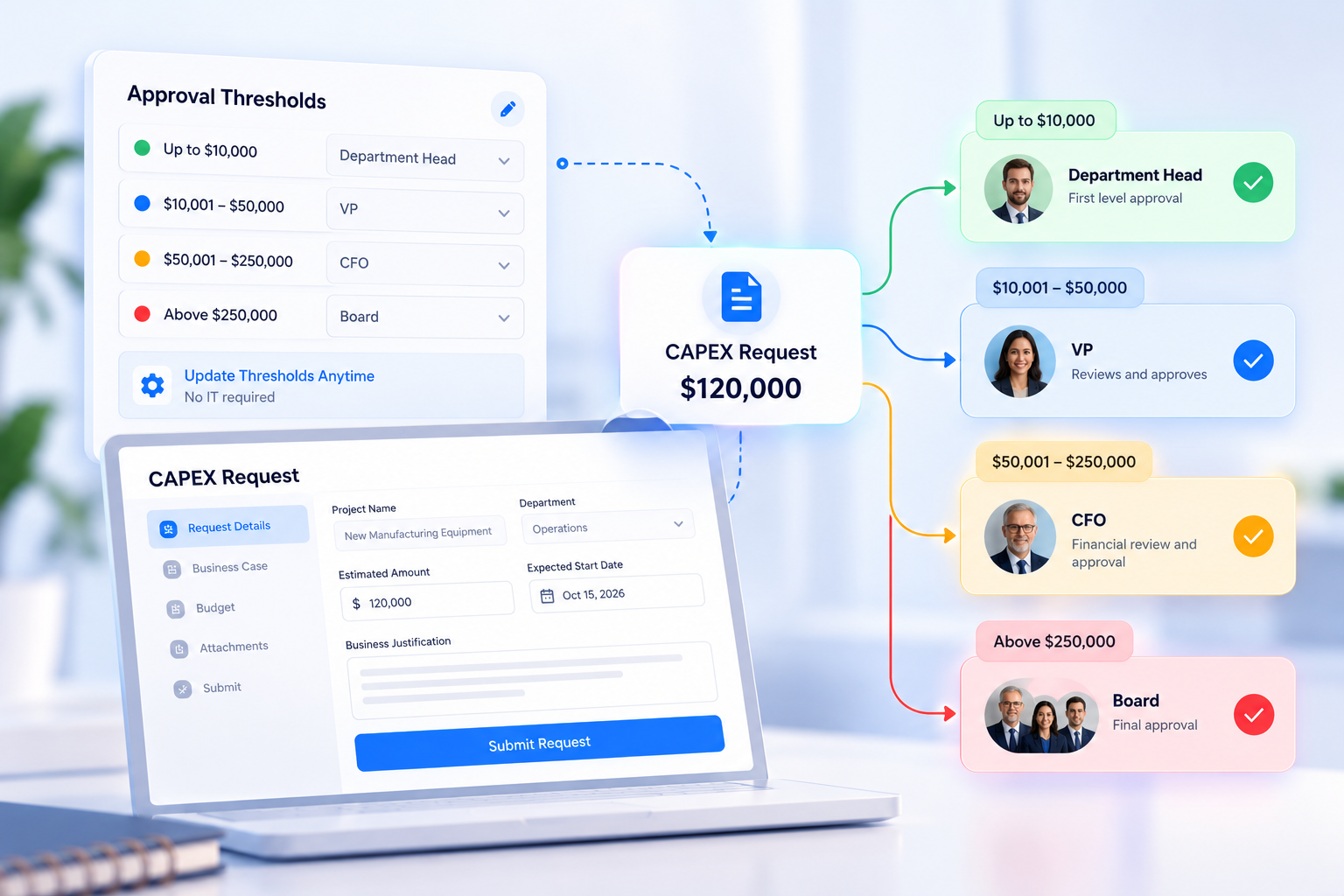
Define value limits once. Requests route to the Manager, Finance Controller, CFO or Board based on amount, department and category.
Live budget validation
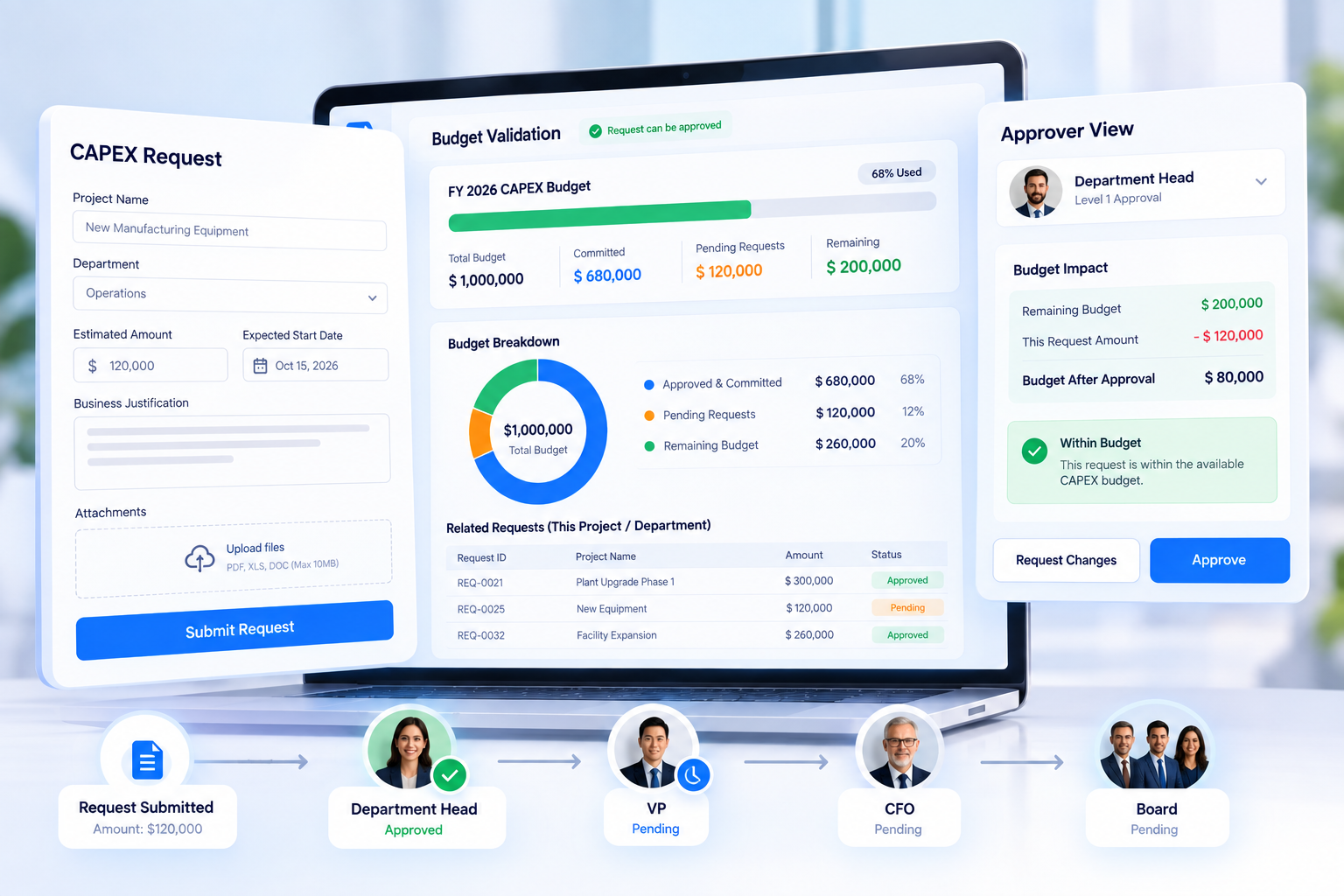
Every request is checked against the remaining budget, so approvers see what is committed, pending and left.
Approve in Microsoft Teams
Instant approvals inside the tool your team already uses.
Mobile apps and email actions
Approve or reject on the go, or straight from email without logging in.
Reminders and escalations
Set SLAs per approval tier. Reminders go out automatically, and overdue decisions escalate to the next level.
Complete audit trail
Every action is time-stamped and attributed, with ISO-ready tracking for audits.
ERP and enterprise integration
Connect your ERP, CRM and collaboration tools so finance data flows without re-typing.
Dashboards and reports
Real-time insight into every open request, bottleneck and cycle time.
AI workflow insights
Recommendations on where approvals stall and how to improve the process.
- How it works
The approval journey, step by step
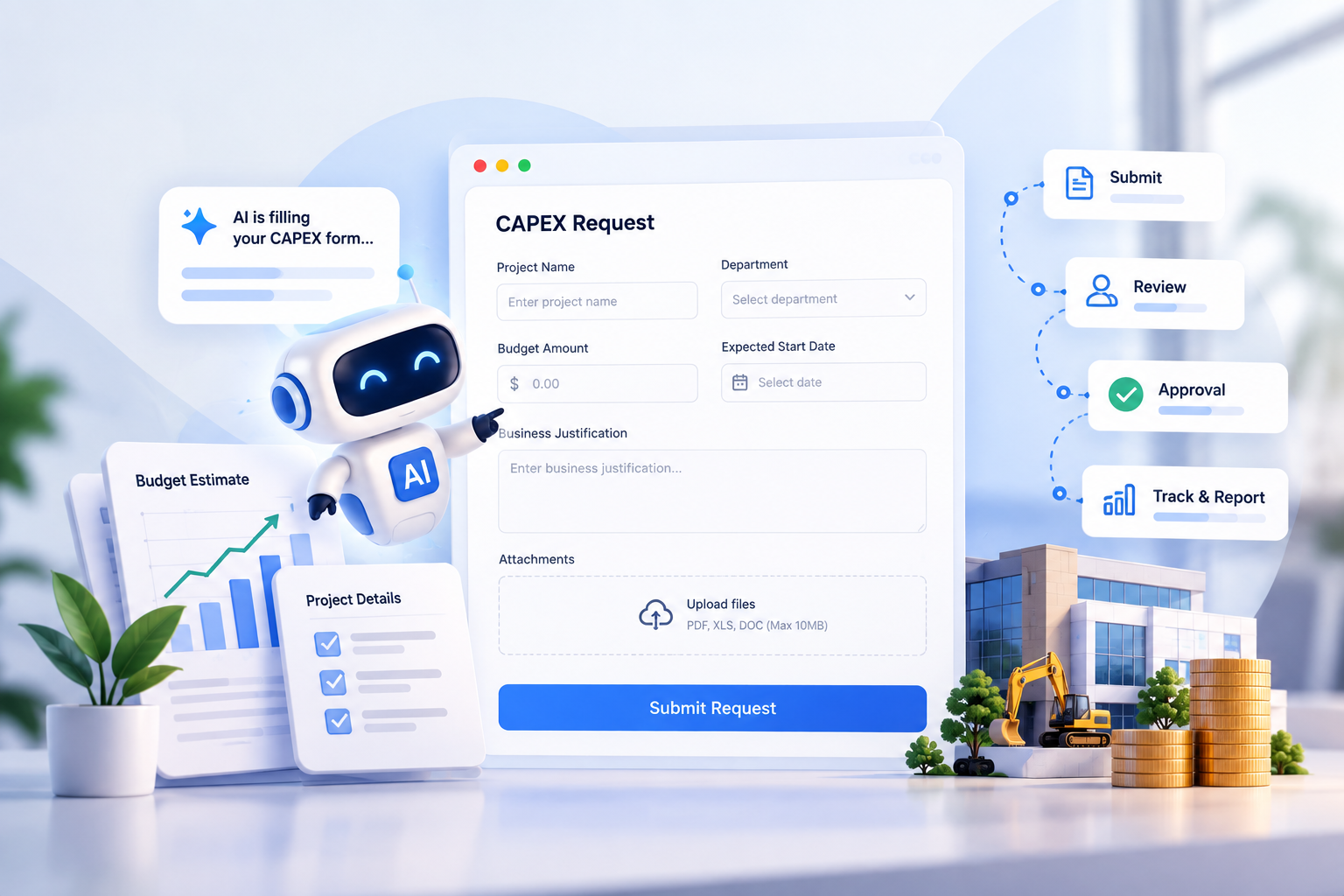
From submission to final decision, see what InstaWorkflows handles at every stage of your finance process.
Exception found: escalated to the right manager, flagged with the reasoning so they can decide quickly.
Request in
AI checks policy and documents
Decision
Exception found: escalated to the right manager, flagged with the reasoning so they can decide quickly.
Outcome
- Before and after
One invoice, two ways of working
Compare manual finance processes with automated workflows and see how automation reduces delays, simplifies approvals and keeps work moving.
Manual process (✗)
- Invoices arrive by email as PDFs, with inconsistent coding and missing details
- Approvals are forwarded by hand, and nobody knows who has the invoice
- Budget is tracked in spreadsheets that are always out of date
- A status check means searching inboxes and pinging people
- The audit trail is scattered across emails, chats and shared drives
- Delays go unnoticed until a supplier complains
InstaWorkflows (✔)
- Structured AI-built forms with required fields enforced before submission
- Value-based routing sends each request to the right approver automatically
- Live budget validation checks spend before approval
- A real-time dashboard shows every request's status, owner and age
- A complete time-stamped audit trail records every action and decision
- Auto-reminders and escalations keep approvals on schedule
- One Platform, Every Stakeholder
Built for everyone who touches a finance request
Finance approvals involve many teams. InstaWorkflows gives each one the visibility, control and speed it needs without extra tools.
Requesters and employees
Requesters and employees
Department heads and managers
Department heads and managers
Accounts payable team
Accounts payable team
Procurement
Procurement
CFOs and finance controllers
CFOs and finance controllers
Compliance and audit
Compliance and audit
- Industry-Ready Finance Automation
Finance automation for every industry
Financial workflow automation looks different in each sector, so approval paths, limits and checks are configured around your own policies.
Manufacturing
Raw material purchases, supplier invoices and plant expenses approved by value and cost center.
Retail and Distribution
High-volume vendor invoices and store-level purchase requests routed by region and category.
Healthcare and Life Sciences
Supplies, equipment and service invoices approved with clinical, compliance and financial review in one flow.
Construction and Engineering
Project-level purchases and subcontractor invoices tracked against project budgets across multiple sites.
Technology and IT Services
Software subscriptions, vendor contracts and team expenses governed with IT, Procurement and Finance sign-off.
Transportation and Logistics
Fuel, maintenance and vendor payments routed by asset, route and regional authority.
- Go live
How to implement finance workflow automation in about 14 days
No lengthy ERP project. Our team configures your first workflow with you, and business users take it from there without code.
1
Pick the process
2
Design with AI
3
Connect and test
4
Go live and improve
- Integrations
Connect Your Existing Tools. Automate Your Finance Workflows.
InstaWorkflows plugs into the systems your finance team already uses, so data flows between platforms without manual entry or duplicate records.
 Microsoft Teams
 Slack
 Zoom
 Google Workspace
 Dropbox
 Box
 AI-First Workflow Automation
 SAP
 Salesforce
 Microsoft Dynamics 365
 Oracle ERP
 ServiceNow
 Jira
- See It Live
Your finance approval workflow, built in front of you
In a 30-minute personalized demo, we will map your approval matrix and show it running in InstaWorkflows with your value thresholds, your routing and your teams.
- Enterprise-Grade Security
Your financial data stays protected, compliant and audit-ready
Finance handles some of the most sensitive data in a company. InstaWorkflows is SOC 2 Type I certified, with independently audited security controls built into every release.
- AES-256 encryption at rest, TLS 1.2+ in transit
- Role-based access control with SSO and SAML support
- Complete audit trail: every action timestamped and attributed
- Geo-redundant backups with custom data retention policies
- Region-based data hosting to meet local compliance requirements

AICPA SOC 2 Type I Certified
- Playbook
Best practices for finance workflow automation
- Start with one high-volume process. Invoices or expense claims show visible results quickly.
- Map your invoice approval workflow before you automate it. Remove steps that exist only because of old habits.
- Name an owner for every step. A step without an owner is where workflows stall.
- Start your AP automation workflow with clean vendor data. Accurate vendor and coding data means fewer exceptions later.
- Set spend limits in every purchase approval workflow. Define thresholds once and let routing do the rest.
- Set deadlines and escalation rules. Let the system chase approvers, not the finance team.
- Review insights monthly. Improve the slowest step first.
KPIs to track after go-live
| KPI | What it tells you |
|---|---|
| Approval cycle time | How long requests wait for a decision |
| Invoice processing time | How quickly an invoice moves from receipt to posting |
| Straight-through rate | How many requests need no manual touch |
| Requests needing follow-up | How much finance still chases by hand |
| Budget variance | Whether spend is staying within plan |
| Audit exceptions | Whether records are complete and consistent |
- Got Questions?
Finance workflow automation FAQs
Answers to the questions finance leaders ask most before automating approvals.